How well does an RTX 4090 run Qwen3.5-27B?
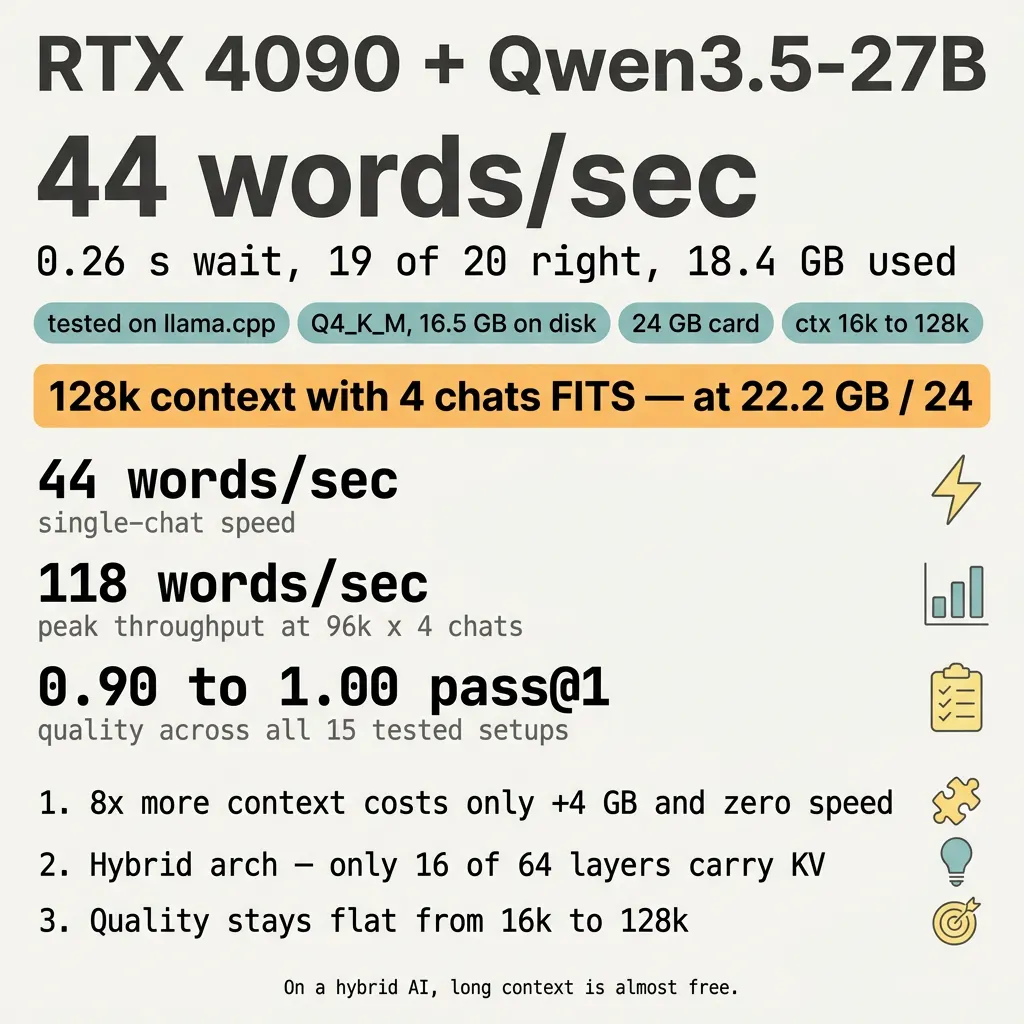
Fig. 1 - visual summary. Source: caveman version.
Contents
- The Hybrid Free-Lunch Rule
- The basic numbers
- The full matrix - context × parallel chats
- Three things that surprise people
- 1. Eight times more context costs almost nothing
- 2. The card runs out of math, not memory
- 3. Quality stays flat across all 15 setups
- What the words mean
- What to do
- Configs you can copy
- Maxim
- Where to go next
I asked one question: how well does an RTX 4090 run Qwen3.5-27B?
44 words a second. A quarter of a second wait. 19 of 20 coding problems solved. 18 GB of memory used out of 24.
The card runs this AI very well.
The Hybrid Free-Lunch Rule
Most AIs slow down hard when you give them more to read at once. This one does not.
I tested 5 reading-window sizes (16k up to 128k tokens) and 3 numbers of chats at the same time (1, 2, 4). All 15 setups ran. The biggest setup - 128k window with 4 parallel chats - fit on the 24 GB card with room to spare. Speed stayed the same.
This is rare. Most models charge a heavy memory tax for long context. Qwen3.5-27B uses a hybrid design where only 16 of its 64 layers carry a memory of past tokens. The other 48 layers don’t need that memory. So growing the window mostly grows a small part of the model, not the whole thing.
That’s the rule: on a hybrid model, long context is almost free.
The basic numbers
| What | Result |
|---|---|
| Speed (single chat) | 44 words/sec |
| Wait before first letter | 0.26 s |
| Correct answers (out of 20) | 19 |
| Card memory used | 18.4 GB out of 24 |
| AI file size on disk | 16.5 GB |
The 20 questions came from a public coding test called HumanEval. Each question gives the AI a coding problem. The AI writes a function. Tests run against it. Passing means the function works on the first try.
The full matrix - context × parallel chats
I pushed both knobs to their limits. 5 context sizes × 3 parallelism settings = 15 setups. Every one ran. None crashed.
Words per second (all chats added together):
| ctx ↓ \ chats → | 1 chat | 2 chats | 4 chats |
|---|---|---|---|
| 16k | 44 | 74 | 111 |
| 32k | 44 | 73 | 96 |
| 64k | 44 | 74 | 100 |
| 96k | 44 | 74 | 118 |
| 128k | 44 | 73 | 118 |
Memory used out of 24 GB:
| ctx ↓ \ chats → | 1 chat | 2 chats | 4 chats |
|---|---|---|---|
| 16k | 17.9 GB | 18.1 GB | 18.4 GB |
| 32k | 18.4 GB | 18.6 GB | 18.9 GB |
| 64k | 19.5 GB | 19.7 GB | 20.0 GB |
| 96k | 20.6 GB | 20.8 GB | 21.1 GB |
| 128k | 21.7 GB | 21.9 GB | 22.2 GB |
Three things that surprise people
1. Eight times more context costs almost nothing
Going from 16k to 128k is eight times more reading. The cost: about 4 GB extra memory and zero speed loss. Most AIs would crash or slow to a crawl.
2. The card runs out of math, not memory
At 128k with 4 chats the card uses 22.2 GB. It still has 1.8 GB free. That free space is not the bottleneck. The math part of the card hits its top speed at 4 chats. Adding more chats would split the same pie thinner without baking a bigger pie.
3. Quality stays flat across all 15 setups
pass@1 (the first-try pass rate on the coding test) ranges from 0.90 to 1.00 across the matrix. There is no slow drop as the window grows. The variation is just sampling noise (the AI sometimes types a typo). The model does not “forget” facts in long contexts the way most models do.
What the words mean
- The AI: Qwen3.5-27B. A free, open AI that is good at writing code and answering questions. The “27B” means it has 27 billion knobs that can be tuned.
- The card: RTX 4090. A computer chip with 24 GB of fast memory. Made for video games. Also great at AI math.
- The software: llama.cpp, free and open. The numbers in this article come from its built-in
llama-server. Other software (vLLM, Ollama, LM Studio) gives different numbers. - Quantisation: Q4_K_M. A way of squashing the AI from huge to about 16.5 GB so it fits on the card. You lose tiny bits of accuracy. You gain speed.
- Context window: how much the AI can read at once. 32k tokens is roughly a long blog post. 128k is roughly a short novel.
- Parallel chats: more than one person talking to the AI at the same time. Like one teacher helping two students at once.
- Tokens per second: how fast the AI types. 44 tokens a second is about 30 English words a second.
- TTFT: the wait before the first letter shows up. 0.26 seconds is fast.
- pass@1: the AI writes code, the code runs, the test passes. 19 of 20 = 95 % correct.
What to do
- One person, normal use: start with 32k context and 1 chat. Cheap, fast, easy.
- Long files or long agent loops: 64k or 96k single chat. Same speed, more room.
- Whole codebase or long research: 128k single chat. Speed unchanged.
- Multi-agent fan-out or batch jobs: 96k × 4 chats. Peaks at 118 words a second.
- Always turn on
--flash-attn onandq8_0cache. Free memory wins. - Don’t run more than 4 chats. The card hits its math ceiling there.
Configs you can copy
llama-server \
  --model ~/models/qwen35-distilled/Qwen3.5-27B-Claude-4.6-Opus-Reasoning-Distilled.i1-Q4_K_M.gguf \
  --mmproj ~/models/qwen35-distilled/Qwen3.5-27B-Claude-4.6-Opus-Reasoning-Distilled.mmproj-f16.gguf \
  --alias qwen35 \
  --host 0.0.0.0 --port 10003 \
  --n-gpu-layers 999 \
  --ctx-size 32768 \
  --parallel 1 \
  --jinja \
  --reasoning on --reasoning-format none \
  --temp 0.6 --top-p 0.95 --top-k 20 --min-p 0.0 \
  --repeat-penalty 1.0 \
  --cache-type-k q8_0 --cache-type-v q8_0 \
  --flash-attn on \
  --metrics
Big-context: change --ctx-size 32768 to --ctx-size 131072.
Multi-agent: also add --parallel 4.
Maxim
On a hybrid AI, long context is almost free. The card holds the whole map.
Where to go next
One day later, the newer Qwen3.6-27B replaced this model on the same card - and scored a perfect 20 of 20 on the same test: How well does an RTX 4090 run Qwen3.6-27B?